// SaaS • Full-Stack
HomeBase

A real estate platform where agents log properties and buyers using local-first forms, on and offline, without losing a single input. Every detail is reviewable and buyer relationships are managed in one place.
The Problem
Real estate agents struggle to log, store, and use property and buyer data cleanly. HomeBase tackles this with two pillars: Sellers and Buyers.During a walkthrough, agents are working off scattered 10+ page paper forms, voice memos, and notes apps. HomeBase replaces that with an organized, collapsible form that works offline, stays easy to navigate, and captures rooms, features, and notes without losing a thing.On the buyer side, agents need to know exactly what a buyer wants while also building a real relationship with them. HomeBase starts with a "First Meet" form covering everything from that initial 30-60 minute conversation, then feeds into a full buyer profile tracking personal info, preferences, and showing details.
The Sellers
Let's jump right into the walkthrough. It's one of the early steps an agent has to take to list a home and it has to be done right the first time. It's at a moderate pace where agents need to spend more time observing the home than documenting it. The information the agent uses to sell this home is all captured here, so missed details are either a call back to the seller or an undersold home.To fix this, I made a page with dropdown forms, broken up into sections, for quick scrolling and easy inputs in whatever room the agent is in. Not all homes can be described with just input fields, so each form has its own field for notes specific to that room or area, and there's a general notes popup for non-area-specific notes. A checkmark confirms a form has been saved, with a status pill indicating the sync status to the database. Bedroom, bathroom, and outbuilding forms are added dynamically depending on the specific property's needs. When a form is saved, it stores the information on the device and immediately tries to sync to the database. If the device is offline and unable to sync to the database, the information is saved to the device until the connection is restored, where it will then attempt to sync again until the data lands safely in the database.Some agents prefer to stage a home so it's ready for them with general details filled out, or the walkthrough is cut short and the agent is unable to finish at that time. For this, there's a walkthrough queue on the dashboard that reminds the agents what walkthroughs are currently active and allows them to easily jump back into it.The simplification of the listing process doesn't end at the walkthrough. Complete homes show up on the dashboard as clickable cards that take the user to that seller's profile. The seller's profile is a clean, clutter-free page that holds the home and owner's information. No filing cabinets with folders and no sections of a home irrelevant to this one. The agent can edit sections in the profile or add the home back to the walkthrough queue to add sections or rooms.
The Buyers
The new buyer form is less dense than the walkthrough forms, but that's only because the magic happens elsewhere on the buyer side of HomeBase. The form is designed to capture only the important information about a buyer that an agent will need and most likely get during their first conversation. Contact info, pre-approval info, urgency and experience, with a few other preference fields.The buyer profile is what makes HomeBase so useful as a customer relations tool. At first glance you have information worth being reminded of constantly, must-have and deal-breaker popups, and buyer contact info. The personal dropdown helps the agent keep track of why they're buying, the size and age of their family, hobbies, birthdays, and upcoming events that build the relationship between them and the buyer. The preference dropdown is what helps the agent match the buyer with the perfect home. It can be added to and customized by the agent any time as they find out more about the buyer and their needs.The second part of the buyer profile is showing mode. Simple but helpful, showing mode allows an agent to quickly take notes. Not in-depth detailed notes, but quick-fire, "I'm in the middle of showing a home", notes. After the showing is over, all the small notes are combined into one AI-generated summary of the showing and neatly documented in the notes dropdown of the buyer profile.
The Outcome / What's next?
This isn't just a side project to fill space on my portfolio. HomeBase is currently being used in the field by real agents, with new agents showing the same interest adn relief for a tool that could make a frustrating part of their career easier and faster. Here's what is planned that will take HomeBase to the next level:
- MLS (Multiple Listing Service) integration to get live listings in the area and match it them to buyers based off their preferrences.
- A link sent to buyers after the new buyer form is filled out that takes them to a preference form. The preferences they fill out update their profile on HomeBase.
- State form autofill, so required state paperwork can be completed in seconds instead of manually.
- Seller profiles getting a listing summary generation, where an agent can produce a full listing summary from a home's location, features, and notes
homebase.isaacyoungs.dev
// WebApp • Vanilla JS
Bullseye Ledger

A mobile-first scorecard app for 3D archery shoots that tracks players, computes distance-multiplied scores, and survives a page reload mid-round.
The Problem
I, like many others, enjoy archery, and 3D archery shoots are one of my favorite weekend activities. For those who don't know, 3D shoots are essentially hikes on a trail through the woods and hills, where you encounter life-sized foam animal targets set at various distances. Each animal has scoring rings painted on it, centered on the vitals, and you shoot one arrow at each target from a designated stake. The issue lies within the scoring, and not the system, but the method. Shooters are given a pencil and paper to document their score for each target and it becomes quite an annoying task with a bow almost always in one hand. The second issue with this scoring method is calculating the totals. Sure, a little addition at the end of your round isn't too bad but what about halfway through? Or with 4 targets left to go? Am I in the lead? Could this target lose me the lead? There is just too much going on to be keeping track of scores, eliminating the inner-group competition. My solution is a tool that goes on your one-handed device, displays live scores, and tracks round stats. Nothing has made the shoots more enjoyable for me than an effortless click of a button to enter a score, and the excitement of a close match where everybody knows it's close.
The Use
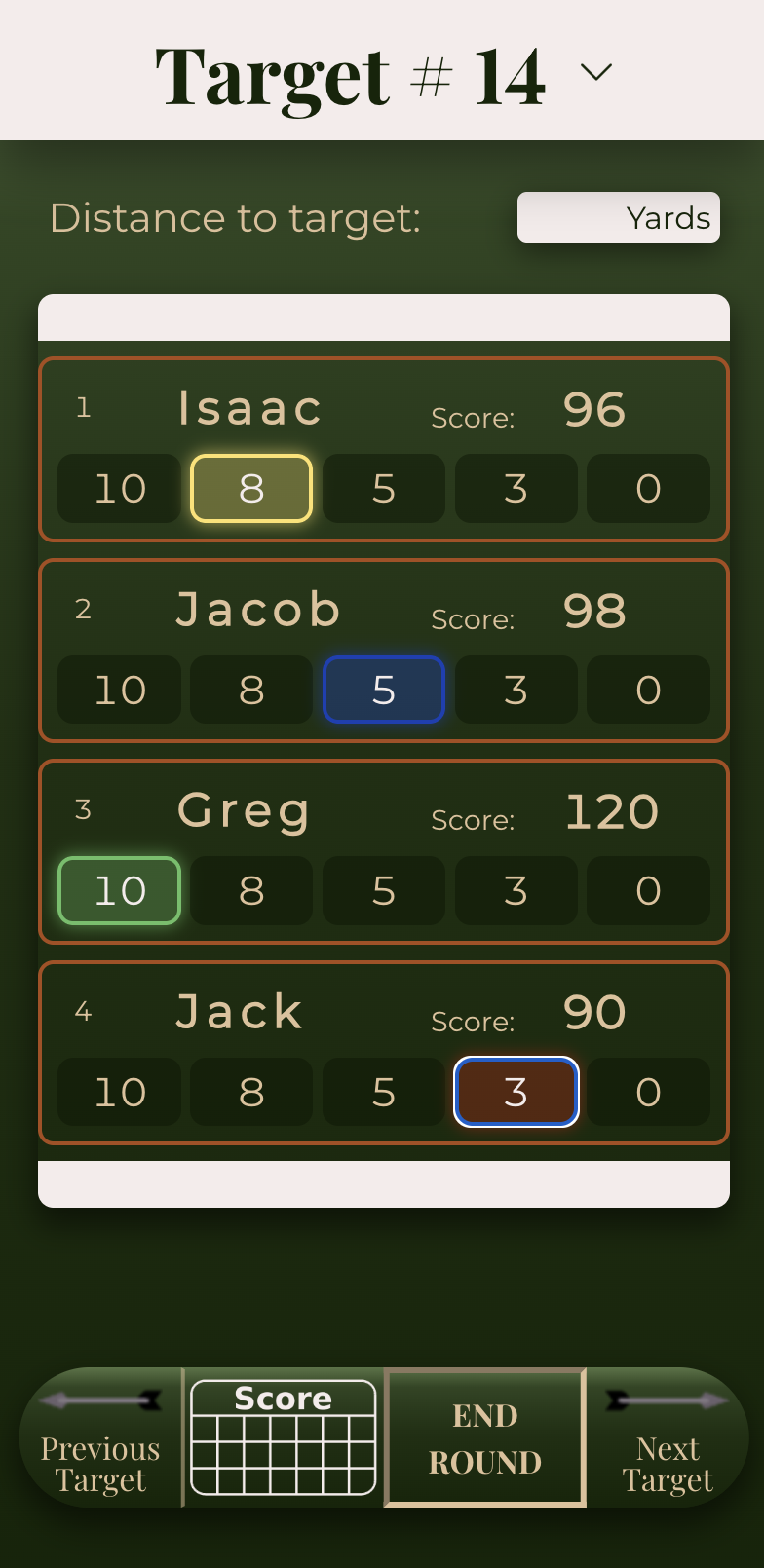
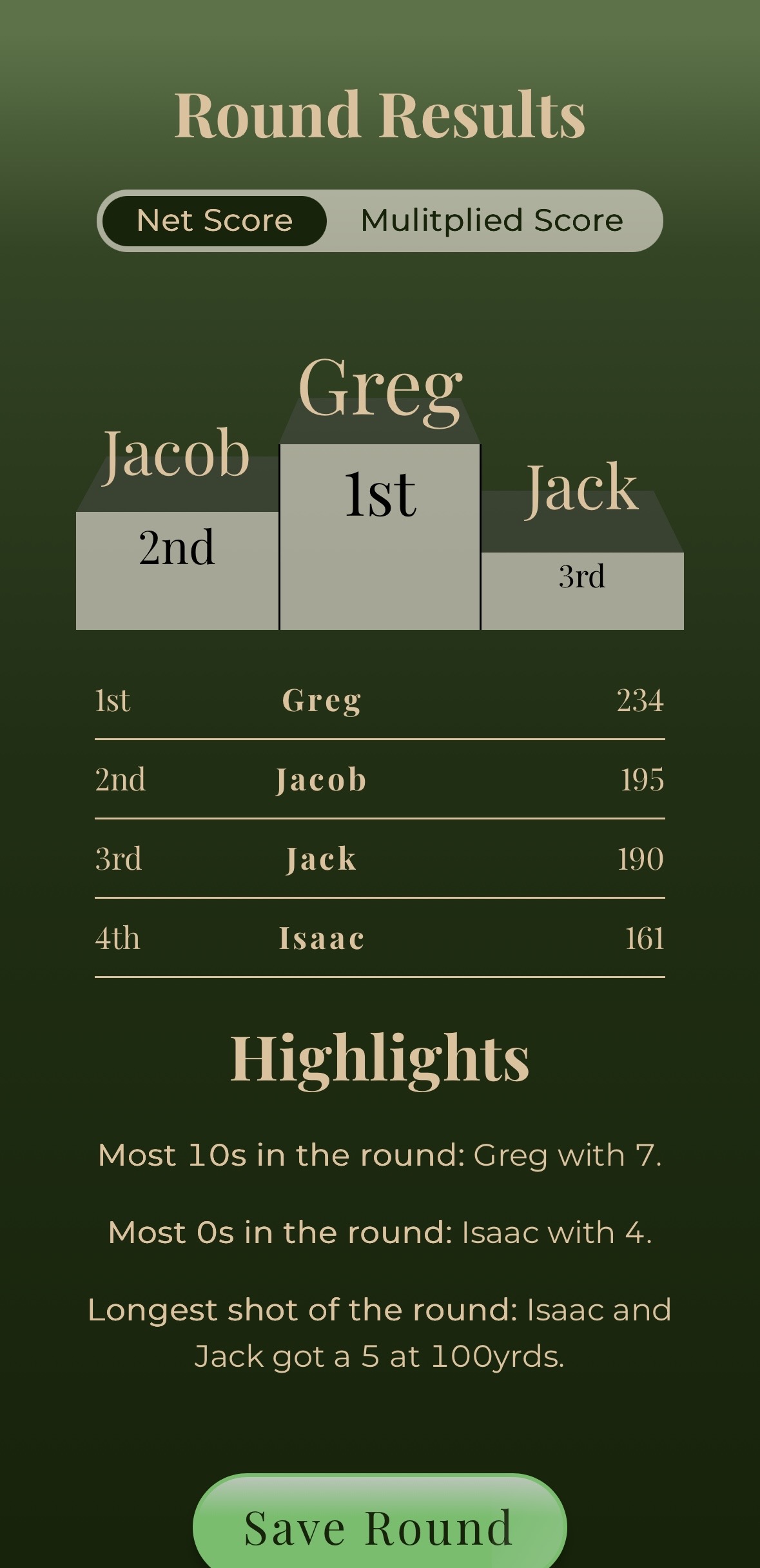
The PWA (Progressive Web App) starts with a simple start screen where you add the players participating in this round, and select whether you'd like the "Distance Multiplier" mode on or off. The Distance Multiplier is a game mode designed to work behind the scenes, and act as a game within the game. In Distance Multiplier mode, distance input is required on each target because a second score is, exactly how it sounds, based off the distance. The further the target, the more your points are multiplied. This means the overall winner of the round might not actually have the highest multiplied score, making it a true game within the game.The in-game, single-page interface is made simple so that one hand and only a couple of brain cells could punch in the score. The large score buttons are color-coded to help prevent any mistakes on input, while live scores update right next to each players' names, so nobody is ignorant to who's in the lead, and who's on their tail. That feature alone has made 3D shoots more exciting, and adrenaline-pumping. A quick pop-up scorecard to look over the previous targets or check multiplier stats. Navigation between targets is seamless with 'previous' and 'next' target buttons, or the user can use the target navigation drop down at the top of the screen to jump to any target.When the round is over the users are taken to a round summary page. The winner sits at the top of the podium with a stat summary to accompany their bragging rights. Users can see who won the multiplied round with a pill toggle that updates the scores to the multiplied totals. Each player's round is reviewable by dropdown. The amount of each score a player got is totaled above their round so you can see who was the most consistent. The highlights section at the bottom of the summary calls out stats worth highlighting: 'The most 10s: Isaac with 8', 'Longest Distance: Jacob got a 10 at 100 yards', and others.
The Outcome / What's next?
Bullseye Ledger is a special project to me. It's the very first project I thought of, scoped, and built entirely on my own. There was no tutorial and no prompt, just a problem I wanted to solve. This is the project that shifted how I think when I sit down and build, or when I come across a bug with no idea of its source. Working on this project and finishing the first version is the first time I felt like a developer. Bullseye Ledger is a lightweight score tracking app that solved a real problem for me and my friends. It's something we now use for every single 3D bowshoot and has enhanced our enjoyment more than anything else. I am very excited for the plans I have to grow this app. A couple include:
- A full backend database with authentication to store stats to an archers profile.
- A labs pages that shows a breakdown of the archers trends, accuracy at certain distances, shots taken and other metrics to help an archer analyze their weak points. Labs will include a practice feature to give archers structure in improving those weak points.
- Archer settings that will allow archers to edit what scoring system they use. This will make Bullseye Ledger more useful to the public since not everybody uses the same scoring system.